 Prakrit Solutions
In many Indian business communities, the financial year starts around Diwali. Shopkeepers and accountants open new account books, write the date on the first page, and begin the year with a clear record of what came before. The habit is simple, and it still works.
Most businesses do not start the year that way. They start with a new tool. A new app, a new automation or a new AI assistant arrives, and within a few weeks nobody is sure which process it replaced, who owns it, or whether it saves any time at all.
Before you add anything new, open your own book. Write down what you do.
Start with one page
Use a single sheet, or one document. For each regular task, record four things:
- What it is. For example: "reply to website enquiries", "send monthly invoices", "confirm supplier payments".
- Who does it. One name, not a team. If nobody owns it, write that down too.
- How often, and how long. A rough figure is enough: "daily, about 20 minutes", "monthly, half a day".
- Where it lives. The inbox, a spreadsheet, a paper register, a phone, a particular app.
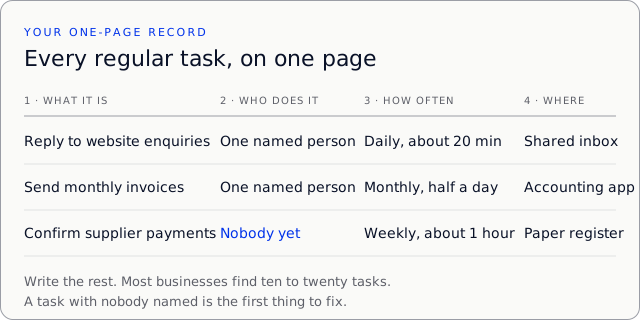
Most businesses find between ten and twenty tasks. Many of them are invisible until they are written down. The enquiry that arrives on a personal phone at night, and the invoice that one person sends from memory, are the common ones.
What it looks like in practice
Imagine a small tuition centre with two teachers and one person at the front desk. This is an illustrative example, not a case study. Their first draft of the page had six rows. Here are three of them:
| What it is | Who does it | How often, how long | Where it lives |
|---|---|---|---|
| Reply to enquiries from parents | Front desk | Daily, about 30 min | Shared phone and WhatsApp |
| Send fee reminders | Nobody | Monthly, about 2 hours | Owner's memory |
| Book demo classes | Front desk | Several a week, 10 min each | Paper diary |
The second row was the discovery. Fee reminders went out late or not at all, and nobody had noticed because nobody had written the task down. Naming an owner fixed more than any software would have. The owner now sends them on the first working day of each month, from a short checklist.
In the example, the centre later added a tool for demo bookings. It worked because the paper diary had already shown them exactly what a booking needed: a name, a phone number, a subject and a time.
Add the cost
For each task, add what it costs to keep running: staff time, software subscriptions, and any tool you pay for by the month or by usage. Keep the figures simple. You are not building a budget. You are learning where the time goes.
Then mark the tasks that cause the most trouble. These are usually the ones with a missed step, a repeated question, or a person who is the only one who knows how to do them.
Only then, decide what to change
Now you have a basis for a decision. Ask three questions of each task you marked:
- Is it worth doing at all? Some tasks exist only because nobody questioned them.
- Does it need a person? Anything involving a judgment, a refund, a complaint or a price should stay with a person, at least for now.
- Would a tool remove the repetition without removing the judgment? Only then is it worth looking at software, and at that point an AI assistant may or may not be the right answer.
This order matters. A tool added to a process nobody has written down tends to copy its confusion. A tool added to a clear, owned and costed process has something to measure against.
Common mistakes
Writing too much. A page with forty tasks gets abandoned. Start with the ten that cause the most noise, and add the rest later.
Guessing the time. A rough figure is fine, but do not leave it blank. Ask the person who does the task to time one run of it.
Skipping the owner. A task with nobody named will drift. If two people share it, pick one person to answer for it.
Counting only software. Staff time is usually the biggest cost. A tool that saves ten minutes a day but needs an hour of setup has not paid for itself yet.
Deciding before writing. If the first conversation is about which tool to buy, pause and open the page first.
A first-week checklist
- Day 1: list every task you can remember, without judging them.
- Day 2: add an owner and a rough time to each one.
- Day 3: mark the three tasks that cause the most trouble.
- Day 4: ask the people involved what they would change, and write their answers down.
- Day 5: decide on one change, or decide to change nothing yet.
The point of the week is to see your work clearly, not to finish a project.
Review it in a month
Put a date in your calendar, about four weeks from now. Read the page again and answer two questions: which tasks did you actually change, and which numbers moved? If you cannot say, the change did not help yet, whatever it looked like on the day.
A business that knows its own work can make better choices about tools for the rest of the year. The record is not a rule book. It is the first page of the new book, and it is worth opening this week.
If you would like help writing this page for your business, or working out which tasks are worth automating, that is the kind of work we do at Prakrit Solutions. You can get in touch and tell us what takes the most time.